At Unicef 🇺🇳
In the Agile and Methodology module, our client, UNICEF Sweden, engaged us in a design sprint to complete a project within one week. As the Scrum Master, I was responsible for enhancing the efficiency of our team, which consisted of four members, including a project manager and a developer. By utilizing Agile practices and facilitating effective collaboration, we successfully delivered the project on time and met all client expectations.
Client’s Brief 🧶
UNICEF Sweden approached us with a problem statement focusing on three main issues:
- Identifying a new target group.
- Developing a go-to-market strategy, including activities.
- Creating a digital concept.
From this, we formulated our design questions to guide the project.
Question of Design
“ How Can We Digitally Engage and Connect With New Target Audiences? “
Solution 💡
Solution 1: BE THEIR HERO – Make a Difference With Every Step
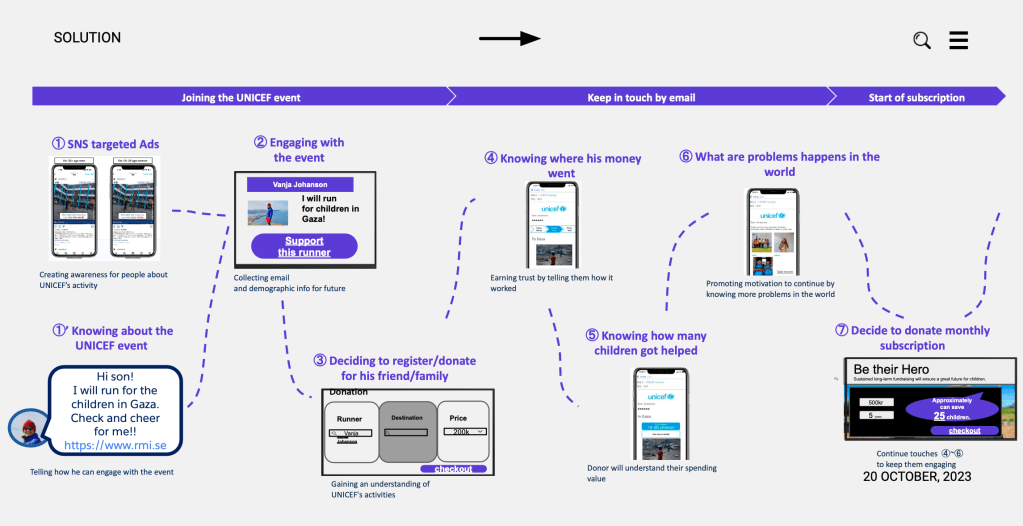
The marathon campaign serves as an inclusive platform uniting two key stakeholders: runners and donors. Runners participate to support their target group objectives through donation campaigns, while donors have the opportunity to support and contribute to these runner campaigns.
Solution 2: Platform Prototype
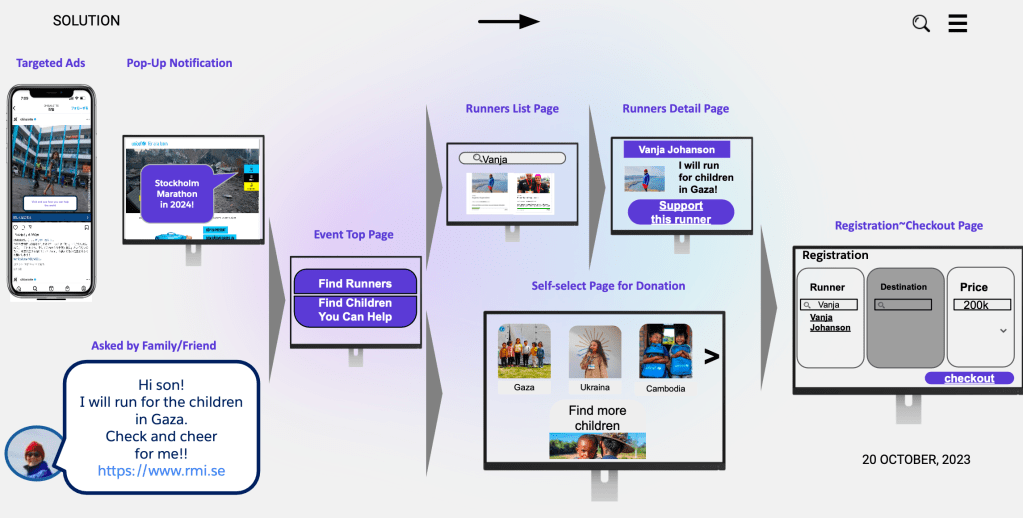
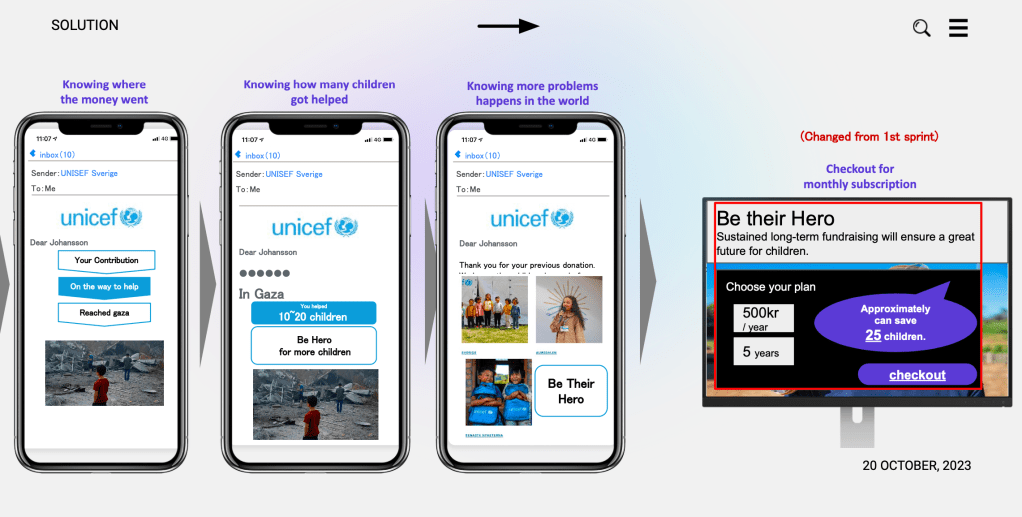
In our prototype solution, we’ve segmented the concept into a three-phase journey:
- Joining Event: Users seamlessly register for the event, ensuring a smooth onboarding process.
- Keep in Touch by Email: Subscribers receive regular email updates, maintaining engagement and fostering a sense of community.
- Start Subscription: We provide an option for users to subscribe, enhancing their involvement beyond the event.
Additionally, we’ve implemented event tracking for donations, enabling donors to see the impact of their contributions and fostering a deeper connection with the cause.
Process 🕹️

Given the one-week timeframe for this project, we structured it into a project sprint. This included breaking down the tasks on a daily basis, defining specific events for each day, and clearly outlining the responsibilities of each team member and stakeholder involved in the project.
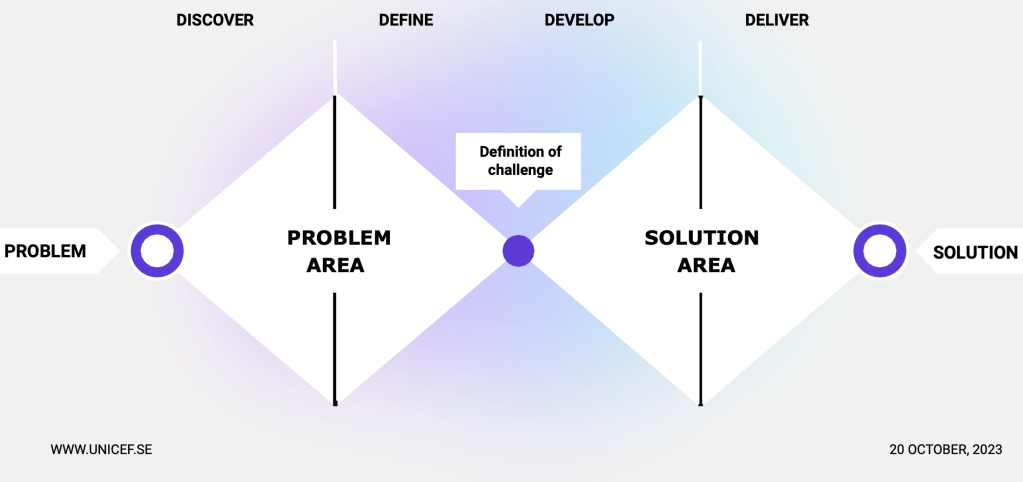
We employed the Double Diamond design methodology to provide a comprehensive overview of the project, integrating it with Agile sprint methodology for effective execution.
Our Approach:
- Defined Roles: Assigned roles including Scrum Master (SM), Project Manager (PM), and development team members.
- Product Backlog: Created and tracked the product backlog using Kanban.
- Agile Events: Conducted essential Agile events such as Planning, Demo, and Retrospective in each sprint.
- Knowledge Log: Documented the process in a knowledge log to maintain a product-focused mindset and ensure continuity and clarity.

Sprint 1: We defined the target audience and campaign strategy, focusing on initiatives such as the UNICEF Marathon, email marketing, and long-term donor engagement. This framework guided us into the next steps.
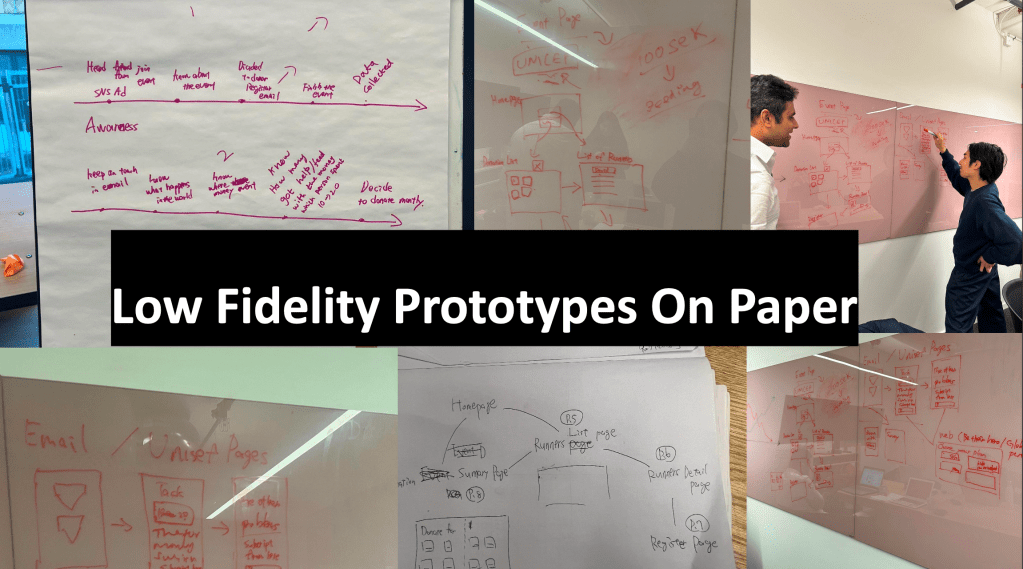
Sprint 2: We developed the campaign titled “BE THEIR HERO – Make a Difference With Every Step.” During this sprint, we refined the key components identified in the first sprint and established a comprehensive marketing campaign. To ensure a long-term approach, we also developed a platform prototype for the UNICEF Marathon event. This prototype aims to enhance connectivity and engagement among participants and foster long-term relationships between runners and donors.
What I learned 🤓
I learned the importance of collaboration and transparency in project management. By assembling a diverse interdisciplinary team and prioritizing open communication, we were able to adapt and meet our goals efficiently in tight deadlines. While ensuring our software met functional requirements, I also realized the significance of comprehensive documentation. Utilizing tools like Notion for process logging and Kanban for backlog management ensured clarity and organization within our team. Embracing an incremental development approach allowed us to anticipate and mitigate risks early on. Regular validations with the client further enhanced our ability to address potential issues proactively. Despite the challenge of condensing our work into two sprints over five days, as opposed to the typical one to four-week timeframe, we remained agile and achieved successful outcomes. This experience reinforced the importance of flexibility and resilience in project execution.
 be. design lab